

Finding out fundamental facts about your technological equipment is sometimes one of the most difficult aspects of utilizing them since it appears like everything is in code and hidden someplace!
But don’t worry, this page will make your life much simpler if you’ve got an LG TV and need to know the model number. Your television’s “model” is often just another way of saying that it has a certain model number.
However, these techniques will be very helpful if you’re also seeking the name of the model of your TV since you can quickly put the model number into Google to obtain the model name or use it to contact an LG representative to discuss your precise product model.
By continuing to use this website you agree to our Terms of Use. If you don't agree to our Terms, you are not allowed to continue using this website.
What Does the TV Serial/Model Number Mean?
Model and serial numbers are on every LG television. LG TV model numbers provide broad details about the TV’s series and design. Moreover, model numbers contain details about:
- Specifications
- TV series
- Screen size
- Year manufactured
To differentiate one LG TV from the others, each one has a unique serial number. Serial numbers reveal details about where the TV was manufactured.
Each individual LG television product’s model and serial number label tag may be found on the box packing, at the back of the unit, or by using the on-screen menu system.
This is a reference manual for locating the model and serial number of your LG Home Entertainment device. The letters and digits that make up the model number of a television are frequently followed by two sets of numbers: one set of numbers that denotes the diagonal screen size and the other set of numbers that denotes the feature level. On the other hand, serial numbers often start with three numbers, followed by four letters, and then a sequence of digits.
Why Would You Need to Know the Serial Number of Your TV?
You’ll need to know the serial number if you want to register your new LG TV for warranty. In case your new device breaks down or malfunctions, you’ll need the serial number to claim the warranty and have it fixed for free, especially if the cause of the issue is a manufacturing defect.
Important Questions To Ask
| What does the TV model number mean? | The year of production and the size of the tv details are included in the Tv serial number. |
| Why is the serial number important? | The serial number is important to claim the warranty. |
| Where is it located? | You’ll find it in the tv settings and also on the back of the tv. |
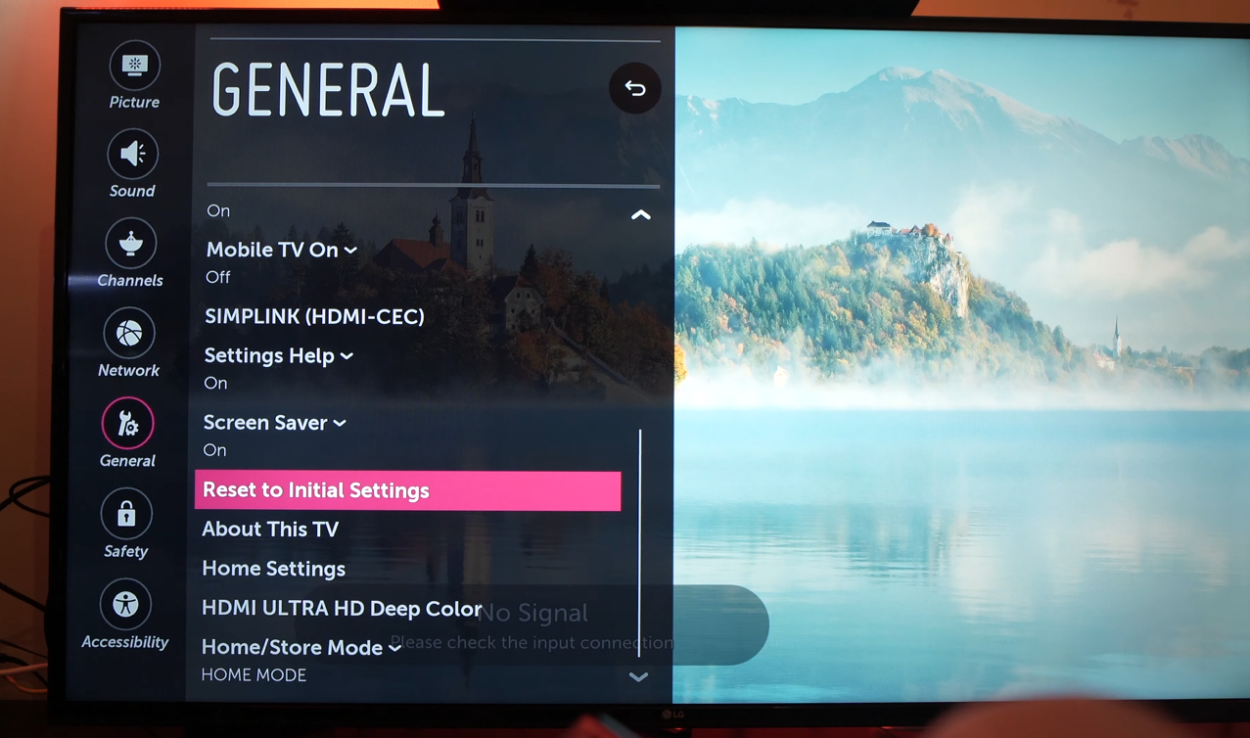
Here are the steps to locate the model number easily:
- Locate it on the menu screen of your television.
- Press ”HOME” on your remote (the one that comes with the LG TV).
- Click ”SETTINGS” in the upper right corner.
- On the bottom, click ”ALL SETTINGS.”
- Choose ”GENERAL.”
- Select ”THIS TV’s ABOUT.”
- Choose ”TV INFORMATION” to finish.
You’ll find the model number right there on the screen. Finding the model of your LG TV should be simple enough if you follow these instructions.
How Do You Determine The LG TV Year?
LG OLED TVs have model numbers like this: 65C8PUA
- The last number 65C8 indicates the year of development
- 9: 2019
- 8: 2018
- 7: 2017
- 6: 2016
For non-OLDER TVs here’s what they usually look like:
- The second letter 49 UM 7400 is the year of development
- N: 2020
- M: 2019
- K: 2018
- J: 2017
- H: 2016
What Distinguishes a Serial Number From a Model Number?
Now that we are aware of where to look for the model and serial numbers on a television and the details they might provide, what really distinguishes the two?
The screen size, series, design, and particular changes of your television are all described by the LG model number.
In contrast, the serial number provides information on the TV’s manufacturing location, assembly line, and production date, even down to the month. The number you need will depend on the issue your product is having.
FAQs
How Can I Identify the LG TV I Own?
On 2018 models and newer, you can show the model information by pressing the mute button on the LG remote three times in a row while the TV is on.
Press the home button on older models, then choose Settings (or Setup), then choose the Support Menu. Select the Product/Service Info checkbox and then click OK to see the model information.
How Can I Tell What Kind of TV I Have?
Find the product sticker on the TV’s back. On the back of the TV, it’s often found at the bottom right corner or bottom center.
To clearly view the label from the front or side of the TV, you can either turn your TV around or hold a mirror behind it. Or you can simply check the box of the TV from when you first bought it, specially if the brand is not readily visible.
What Is the LG TV’s Hidden Menu?
For best results, access the hidden menu on your LG TV using the original remote control whenever possible. Hold down the menu buttons on both your remote control and the TV at the same time.
When a password request appears, let go of both presses, then enter your TV’s password, which could be 0000, 0413, or 7777.
Conclusion
- LG TV model numbers provide a number of details about the TV unit and design.
- The screen size, series, design, and particular changes of your television are all described by the LG model number.
- The serial number is shown numerically, making it somewhat simpler to use.
- If the TV breaks down, you’ll need the serial number to claim the warranty.
Other Articles
- Can Samsung TV Use Zoom? (Workarounds Included)
- How to Reset a Samsung TV Remote (Find Out)
- How Do I Turn On Bluetooth On My Samsung Smart TV?