


My home-office situation often keeps my home a mess because of the tons of devices I have to connect to the plugs. So, I had been searching for a solution to untangle the web of charging cables and adapters that seemed to multiply.
And luckily, I found the “Mission Charging Hub” – a solution for my cluttered tech-web. With its trio of USB ports, each delivering a hearty 1.5 amps, I can now charge multiple devices simultaneously. This simple yet powerful hub promised to bring order to my cable chaos.
The installation was an easy process, and I didn’t need a single tool. The Mission Charging Hub attached itself to the base of my Amazon Echo 4th generation. It has become an extension of my smart home setup.
If you’re also looking for a solution to clear your wirey mess from your home and want to learn more about this simple yet powerful device, then you’ve landed in the right place. So let’s get started!
| Feature | Description |
| Multiple USB Ports | 3 USB ports for charging multiple devices concurrently. |
| Rapid Charging Capability | Provides 1.5 amps per port for efficient and fast charging. |
| Cost-Effective Solution | Affordable pricing at $27.99, offering excellent value for money. |
| Tool-Free Setup | Easy and hassle-free installation, no special tools required. |
| Compatibility Requirement | Compatible with Amazon Echo 4th generation, not suitable for older Echo models. |
| Easy Setup with Amazon Echo | Securely attaches to the base of the Echo, providing a unified appearance. |
| Practical Design | Blends seamlessly with the Echo while holding it securely in place. |
| Charging Convenience | Allows charging of various devices in one central location, promoting convenience. |
By continuing to use this website you agree to our Terms of Use. If you don't agree to our Terms, you are not allowed to continue using this website.
Mission Charging Hub for Your Amazon Echo
The Mission Charging Hub is a versatile accessory for the Amazon Echo 4th generation, offering a good charging solution with a host of compelling features. Here’s a closer look at its key attributes:
1. Multiple USB Ports: The Mission Charging Hub has three USB ports, providing users with the ability to charge multiple devices concurrently. This feature is especially valuable in our tech-driven world, where various gadgets require regular recharging.
With three USB ports at your disposal, you can effortlessly charge your Echo and other compatible devices simultaneously.
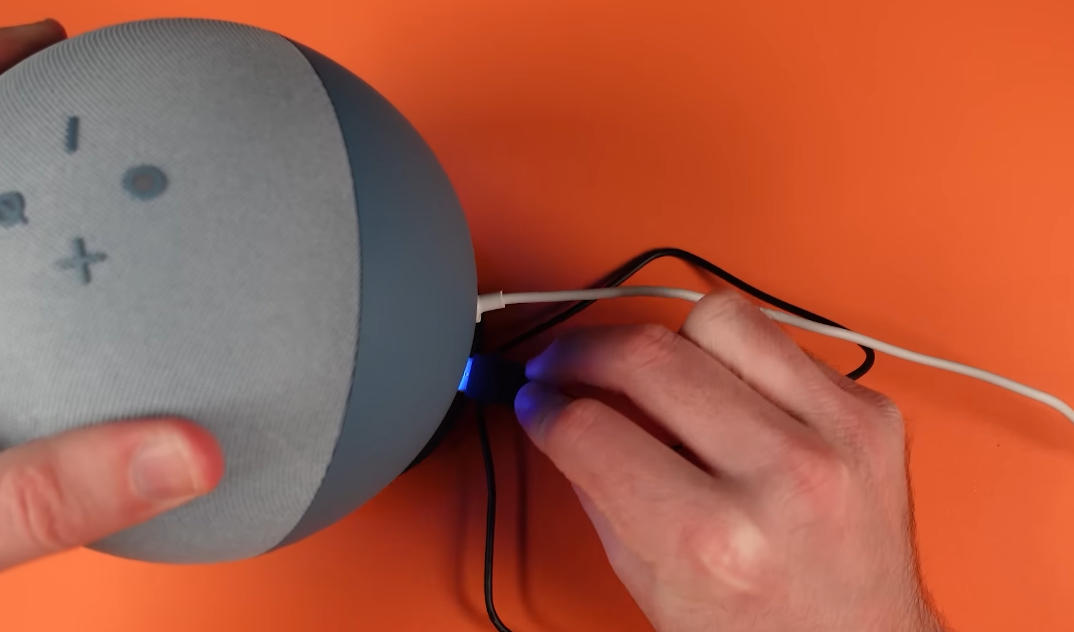
2. Rapid Charging Capability: One of the standout features of this charging hub is its 1.5 amps per port, ensuring lightning-fast charging for your devices.
Whether it’s your smartphone, tablet, or Echo itself, the Mission Charging Hub delivers an efficient power supply, reducing downtime and keeping your devices ready for action.
3. Suitable Design for Echo 4th Gen: Unlike generic charging hubs, the Mission Charging Hub is purpose-built for the Amazon Echo 4th generation.
Its design works great with the Echo, making it an aesthetically pleasing addition to your smart home setup. It attaches securely to the base of the Echo, becoming an integral part of your Echo.
4. Cost-Effective Solution: In addition to its functionality, the Mission Charging Hub offers an affordable solution for those seeking to enhance their Echo experience. Priced at just $28, it provides exceptional value for money, allowing you to optimize your Echo without being pricey.
Setup Guide
Setting up the Mission Charging Hub for your Amazon Echo 4th generation is as easy as a piece of cake! This step-by-step guide ensures a smooth installation process:
1. Align the Power Port: Begin by locating the power port on the base of your Amazon Echo 4th Gen. You’ll notice that the Mission USB Charging Hub has special pogo pins. Align these pins with the power port on the Echo.
2. Secure with the Thumb Screw: Once aligned, it’s time to secure the Mission Charging Hub in place. You don’t need any special tools for this – just your thumb. There’s a thumb screw provided with the hub. Use it to gently fasten the hub onto your Echo.
3. Connect Your Devices: With the Mission Charging Hub securely attached, you’re ready to power up your gadgets. Plug your USB-powered devices into the hub’s USB ports. You can charge multiple devices simultaneously, making it super convenient.
Tool-Free Setup
The best part of this installation process is that it’s completely tool-free. You don’t need any complicated tools or technical expertise. It’s designed to be user-friendly, allowing anyone to set it up effortlessly.


Compatibility Requirement
The Mission Charging Hub is designed to work perfectly with the Amazon Echo 4th generation. However, it’s essential to note that this charging hub is not compatible with earlier versions of the Amazon Echo.
So, if you have an older Echo model, it won’t fit or work with the Mission Charging Hub. It’s always good to check your Echo’s generation before getting this hub to make sure they’re a good match.
Benefits of Using the Mission Charging Hub
Using the Mission Charging Hub comes with several great benefits that make your life easier and more organized:
Simplify Your Space: This hub helps tidy up your charging space by providing a single place to charge multiple devices. No more messy cables or devices scattered around.
Plus, you won’t need many power adapters because it can charge several gadgets at once. That means fewer things on your desk and a little to no mess.
Easy Setup with Amazon Echo: It’s super easy to attach the Mission Charging Hub to your Echo. It securely connects to the base of your Echo, making it feel like one complete unit.
Practical Design: The Mission Charging Hub doesn’t just help with charging; it also looks good. Its design fits perfectly with your Amazon Echo.
Moreover, it’s not just good in appearance; it’s also a very practical design that can hold your Amazon Echo in place.
Charging Convenience: You can charge all sorts of things with this hub – tablets, phones, and other devices. You don’t have to search for different chargers; everything is right there, ready to charge up.


Mission Charging Hub Simplifies space, has an easy setup with Echo, has a practical design, and charges various devices conveniently.
Where Can You Use It?
You can use the Mission Charging Hub in many useful situations:
- Home Office Helper: If you have a home office with lots of devices like your computer, tablet, and Echo, this hub is a lifesaver. It keeps all your gadgets charged up so you can work smoothly.
- Family Charging Spot: It serves best as a spot in your living room where everyone in the family can charge their phones, tablets, or other devices—a handy family charging station.
- Boost Your Echo: The Mission Charging Hub also makes your Echo even smarter. It can power up other devices that work with your Echo, making your smart home even more intelligent.
Review
The Mission Charging Hub is a fine product based on its performance and usability. The tool-free installation process is user-friendly, making it accessible even for non-technical users. Its three USB ports, each providing 1.5 amps, ensure efficient and fast charging, enhancing device usability.
From a technical perspective, the Mission Charging Hub’s design integration with the Amazon Echo 4th generation is practical and aesthetically appealing. However, a minor drawback is its limited compatibility, catering exclusively to the Echo 4th gen.
In terms of convenience, the hub centralizes charging, reducing cable clutter and the need for multiple power adapters.
The secure attachment to the Echo base shows engineering precision. While it effectively serves its purpose, some users may seek broader device compatibility.
Overall, the Mission Charging Hub delivers on its technical promises, making it a valuable addition to an Echo-centric tech setup.
Rating: 9 out of 10.
If you want to dig up some more information, you might find the video below useful:
FAQS
Can a USB hub be used for charging?
Yes, a USB hub can be used for charging multiple devices simultaneously. It allows you to connect several USB-powered devices, like smartphones and tablets, to a single USB port on a computer or charger, enabling efficient charging for all connected gadgets.
What is the USB port on Amazon Echo for?
The USB port on an Amazon Echo serves various purposes, including firmware updates and accessory connectivity. However, it’s primarily designed for power, allowing you to charge compatible devices or connect accessories like the Mission Charging Hub to enhance the Echo’s functionality.
How do I charge multiple USB devices at once?
To charge multiple USB devices at once, you can use a USB hub or a multi-port USB charger. Simply plug the hub or charger into a power source, then connect your devices to the available USB ports on the hub or charger.
This setup allows you to charge multiple devices simultaneously, saving time and reducing clutter.
Conclusion
- The Mission Charging Hub is a device designed for the Amazon Echo 4th generation, offering multiple USB ports for efficient charging. It simplifies charging and enhances your Echo experience.
- With three USB ports delivering 1.5 amps each, it ensures fast and efficient charging for your devices.
- The tool-free installation process simplifies setup, making it accessible to all users.
- By centralizing charging, it declutters your space, reducing cable mess and the need for multiple adapters.
- It accommodates various devices, making it a versatile charging station for your entire tech arsenal.
- Priced at just $28, it offers great value for those seeking an affordable yet effective charging solution.
- It’s designed exclusively for the Echo 4th generation, ensuring a perfect fit and function.